Karaoke DVD Burner
Make karaoke DVD discs from CD+G songs and video files
Make karaoke DVD discs from CD+G songs . Karaoke DVD Burner is powerful software
to compile and burn DVD video karaoke discs from CD+G and MP3G files or AVI and MP4 videos.
You now can play your favorite karaoke songs on standard DVD or Blu-ray player. Create DVD discs with hundreds of songs!

Karaoke DVD Burner software allows you to:
- Create DVD discs with compilations of CD+G songs
- Convert several CD+G discs into single DVD disc
- Burn karaoke discs using your computer's DVD
- Make discs containing hundreds of songs
- Burn MP3G files to DVD discs
- Easily select karaoke songs from DVD disc using multilevel menus
- Create your own look and feel of a disc
- Scan hard disc for karaoke songs and place them on DVD
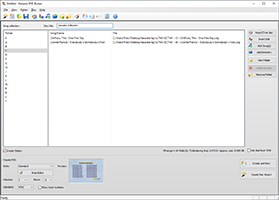
Karaoke DVD Burner Screen
Karaoke DVD Burner is a user-friendly program to create karaoke DVDs.
-
Create DVD discs with compilations of CD+G songs
Karaoke DVD Burner can use BIN, MP3G (pairs of CDG and MP3) files from your hard disc or you may read songs directly from CD+G discs using the built-in reader. You may also use AVI or MP4 videos.
Important notice: to read CD+G discs your CD/DVD drive has to be able to extract CD+G subcodes. Most of modern drives are capable of this, but we cannot guarantee it will work on all devices. Use a trial version to see if your drive works fine before you purchase this program.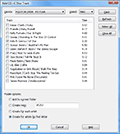
Adding CD+G Track
- Burn DVD discs on any computer with DVD writer - no special equipment is required.
- DVD disc created with our software will play on any DVD player.
- You may fit up to 300 karaoke songs per disc using standard compression settings.
-
Karaoke DVD Burner automatically creates menus for a DVD disc.
- Use folders to organize your songs. The root menu of a disc will contain the folder list (it may span onto several pages if necessary) and menu items will lead to submenus with actual songs. This allows you to arrange songs in alphabetic order: you may order them by genre, or by the disc songs came from. Menus are created automatically and navigation buttons are added if needed.
- You may also use flat directory structure. DVD discs created with this setting will have only one level of menus, containing all songs. If all songs will not fit one page, subsequent menus will be created and navigation buttons will be added to the menus.
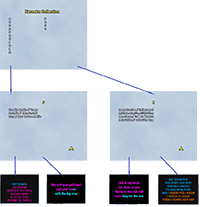
Submenus
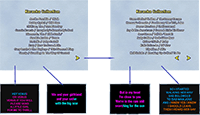
Flat menus
- Smart add function allows to scan the disc for karaoke files and automatically create folders based on ID3 tags or file names. You may easily organize your songs in alphabetic order or by CD+G disc ID.
- Create Disc Wizard allows to create and burn DVD disc in three simple steps.
- Use predefined video karaoke DVD styles or define your own with the built-in Style Editor.
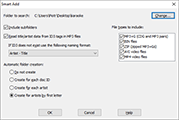
Smart Add
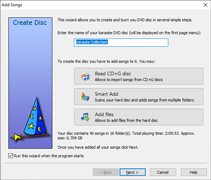
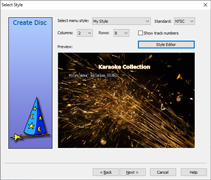
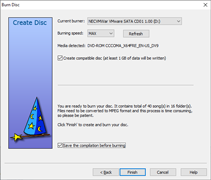
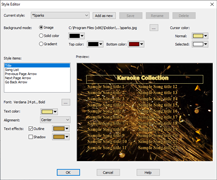
Style Editor
System requirements
We recommend Windows 11 or Windows 10 to run our software. It also works on Windows 8 and Windows 7. Needs at least 3 GB free RAM. It will not work on Mac.
Click here to view a full online manual for Karaoke DVD Burner in a new window
Karaoke DVD Burner costs $59 USD.
If you purchased our software in the past, you can get Karaoke DVD Burner for $59.